How to Pick an After-Hours Answering Service for HOA Boards
A burst pipe at 9:40pm shouldn't turn into a board complaint. Here's how HOA boards pick, configure, and audit an after-hours answering service.
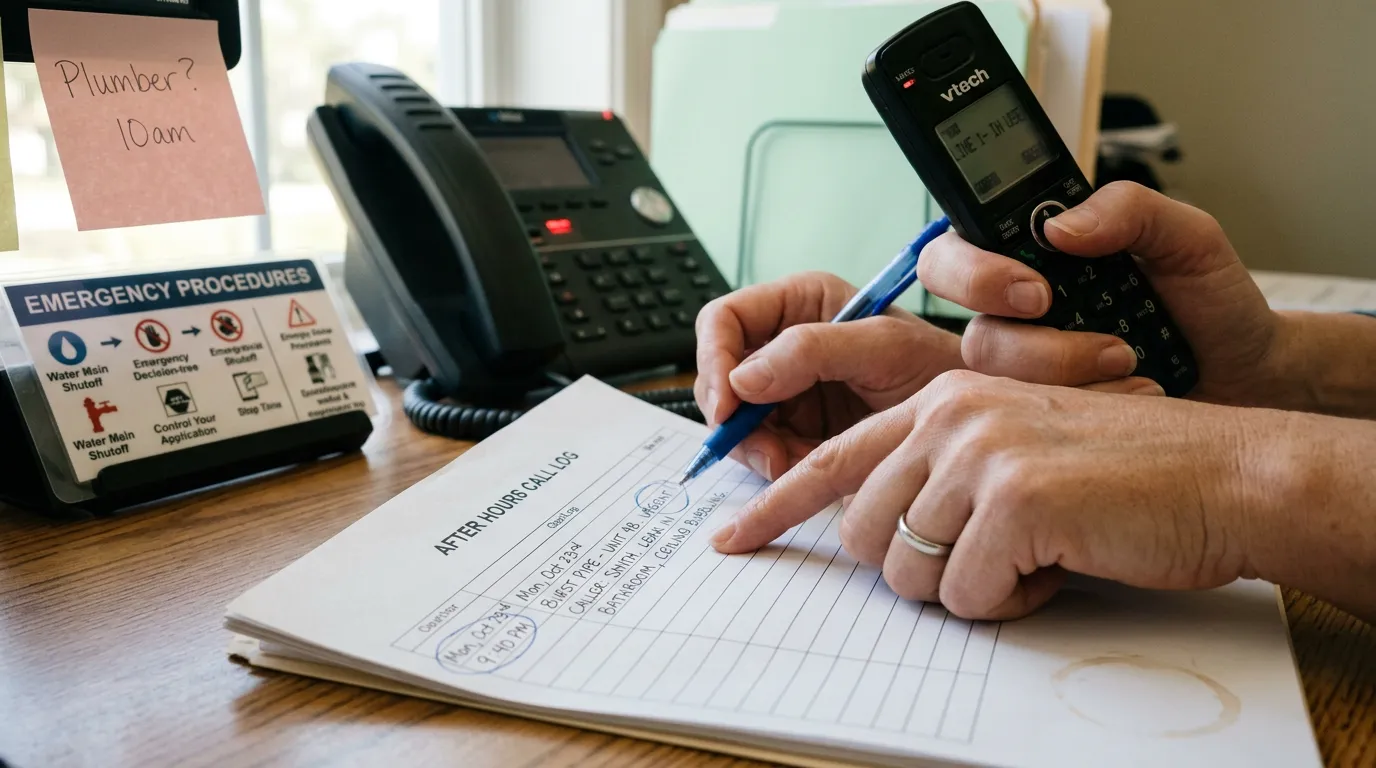
It's 9:40 on a Saturday night and a pipe bursts in a third-floor unit. The resident calls the HOA's main office number, gets a voicemail greeting that was recorded two managers ago, and hangs up angry. By Monday morning, that voicemail has turned into three more calls, a board complaint, and a water-damage claim that could have been smaller if someone had picked up the phone. This is the gap every HOA board and property management office eventually runs into: daytime staff can't be on call 24 hours a day, but emergencies and urgent maintenance issues don't wait for business hours.
An after-hours answering service closes that gap, but only if it's set up with the right rules, the right people, and the right follow-through. This playbook walks through how to choose one, configure it correctly, and keep it accountable once it's live.
The play at a glance
- Define what counts as an emergency for your community and what doesn't.
- Build a written decision tree the service will follow before you talk to a single vendor.
- Score vendors against a short list of non-negotiables: response time, escalation accuracy, logging, and compliance.
- Run a 30-day pilot with a small volume of real calls and a weekly review.
- Train the board, management staff, and residents on how the new line works, then monitor it monthly.
Step 1: Define "after hours" and "emergency" in writing
Before you look at a single vendor, your board and management team need to agree on definitions. Most of the complaints boards have about answering services trace back to this step being skipped — the service wasn't wrong, the instructions it was given were vague.
Start with two lists:
- True emergencies that justify waking someone up: active flooding, fire or smoke, gas odor, elevator entrapment, security gate failures that compromise safety, downed power lines, and loss of heat during freezing temperatures. The National Fire Protection Association and most local fire codes can help you define thresholds for fire- and carbon-monoxide-related calls specifically.
- Urgent but non-emergency issues that can wait until the next business morning but need a same-day callback: noise complaints, parking violations, minor leaks already contained, HVAC outages in mild weather, or access card issues.
Write both lists down, assign an owner (board president, property manager, or management company), and attach phone numbers and backup contacts for each emergency category. This document becomes the script the answering service works from, so the more specific it is, the fewer judgment calls the service has to make on your behalf.
Step 2: Build the escalation path before you shop
An answering service is only as good as the instructions behind it. Map out, in order, who gets called for each emergency type, how long the service waits before moving to the next person, and what happens if nobody answers. A simple version looks like this:
| Issue type | First contact | Wait time | Escalation |
|---|---|---|---|
| Active flooding/fire | On-call maintenance lead | 5 minutes | Property manager, then board president |
| Security/safety | On-site security or police non-emergency line | Immediate | Property manager |
| Non-urgent maintenance | Logged for next business day | N/A | Management office queue |
This exercise also tells you which calls genuinely need a live person versus which ones just need to be captured accurately and routed the next morning. That distinction matters a lot when you get to pricing and plan selection, since most services charge more for live triage than for message-taking.
Step 3: Choose between a live answering service, a virtual receptionist, and an AI-based option
There are three general categories of after-hours coverage, and HOAs tend to land on different ones depending on volume and budget.
- Live human answering services staffed by trained agents who follow your script and escalation rules. Good for communities with frequent night calls or a high proportion of non-English-speaking residents who need a live conversation.
- AI-based answering and voice assistants that can handle call intake, basic triage, and routing automatically, often at a lower per-call cost. These have improved enough that many management companies now use them as a first-line filter even with a human backup for true emergencies.
- Hybrid setups that route calls to AI for standard triage and escalate automatically to a live person or on-call staffer only when the call matches an emergency keyword or pattern.
If you're trying to decide between these categories, it helps to compare them side by side rather than guess. A detailed breakdown of human vs. AI virtual receptionists for HOA boards walks through the tradeoffs in call quality, cost, and resident experience. If you're specifically weighing AI-first vendors, this comparison of AI answering services for HOAs and small property managers is worth reviewing before you request quotes.
Step 4: Score vendors against non-negotiables
Once you know what kind of service fits your community, evaluate specific vendors against a short, concrete list rather than a sales pitch. At minimum, ask each vendor to demonstrate or document:
- Average answer time for inbound calls after hours (ask for a number, not a range).
- Escalation accuracy — how they confirm a call was correctly categorized as emergency vs. routine, and what happens if the on-call contact doesn't pick up.
- Call and message logging that your management team can review the next morning, ideally tied to a resident's unit or account rather than a loose spreadsheet of names and numbers.
- Texting and SMS compliance if the service also sends text confirmations or updates — this touches 10DLC registration and consent rules that the Federal Communications Commission and mobile carriers enforce. If texting is part of your after-hours plan, review this 10DLC compliance guide for HOA and property manager texting before signing anything.
- Pricing structure — per-call, per-minute, flat monthly, or tiered by call volume. Costs vary widely between live and AI-based vendors, so it helps to see real numbers before comparing proposals; this breakdown of what HOA boards and property managers actually pay for AI answering services gives a useful baseline.
- Data handoff — can call transcripts, voicemails, and SMS threads sync into whatever system your management team already uses to track resident communication? If every after-hours call lives in a separate portal from your daytime records, you lose the full picture of a resident's history. A platform like QuorumVoice is built around keeping every call, voicemail, text, and email tied to a single contact timeline, so after-hours activity doesn't disappear into a vendor's own silo.
Ask for references from other HOAs or management companies of similar size, and ask specifically about a weather event or a mass-notification scenario — that's when call volume spikes and weak vendors show their limits.
Step 5: Pilot before you commit
Don't sign a multi-year contract on the first call. Run a 30-day pilot with a limited scope — one or two communities, or one building if you manage several — and track every call that comes through. During the pilot:
- Review a sample of recorded calls or transcripts each week against your escalation script.
- Call the after-hours line yourself, posing as a resident with both an emergency and a routine issue, to see how the service actually handles the fork.
- Check how quickly on-call staff are notified and whether the notification method (text, call, email, app alert) matches what your team actually responds to.
- Confirm that message details — unit number, callback number, issue description — show up accurately in the next-day report.
At the end of the pilot, hold a short debrief with the property manager, board liaison, and anyone who took an on-call escalation. Fix the script, not just the vendor — most issues at this stage come from unclear instructions rather than vendor failure.
Step 6: Train your team and your residents
A new after-hours line only works if people use it correctly. Update the HOA website, resident portal, and voicemail greetings with the new number and clear instructions on what counts as an emergency. If your community uses text messaging for updates, make sure the after-hours number is covered under your existing opt-in language — the SMS opt-in examples and compliant templates for HOAs post has ready-to-use language if you need to update consent notices.
Internally, give your management team a one-page reference card with the escalation path, vendor contact number for complaints or outages, and a reminder of what gets logged where. If text communication is part of the after-hours flow, the 40 HOA and property management text message templates post gives staff pre-written language for common after-hours scenarios like leak acknowledgments or maintenance callbacks.
Metrics and accountability
Once the service is live, someone on the board or management team should own a monthly review. Track these figures and compare them against the ranges below:
| Metric | What it tells you | Target range |
|---|---|---|
| Average answer time | How quickly callers reach a person or system | Under 30 seconds for live services; immediate pickup for AI |
| Escalation accuracy | Percentage of true emergencies correctly flagged and escalated | 95% or higher |
| On-call response time | Time between escalation and staff acknowledgment | Under 15 minutes for true emergencies |
| Call abandonment rate | Callers who hang up before being helped | Under 5% |
| Message accuracy | Correct unit, callback number, and issue details in next-day reports | Near 100% |
| Resident complaints about after-hours handling | Early warning sign of script or vendor problems | Downward trend month over month |
Pull these numbers from whatever reporting the vendor or platform provides, and if the vendor can't produce them on request, that's worth treating as a red flag during renewal discussions.
Common failure modes and how to prevent them
- Vague emergency definitions. If "emergency" isn't defined in writing, agents default to either escalating everything (waking up board members for a clogged sink) or nothing (letting an actual flood wait until morning). Fix: revisit the written decision tree from Step 1 every time a call gets mishandled, and update it rather than just scolding the vendor.
- No feedback loop with the vendor. Boards often set up a service and never check in again. Call quality tends to drift as agents turn over. Fix: schedule a recurring quarterly call review, even after the pilot period ends.
- Disconnected records. When after-hours calls live in a separate system from daytime call logs, management teams lose context on repeat callers and recurring issues. Fix: require that after-hours activity feed into the same contact history your office already uses, whether that's a CRM, property management software, or a platform like QuorumVoice that keeps every channel on one timeline.
- Texting without compliance checks. Sending automated text confirmations or updates without proper consent language or 10DLC registration can get numbers flagged or blocked by carriers. Fix: review the 10DLC compliance vs. toll-free texting playbook before adding SMS to your after-hours workflow.
- Treating the pilot as optional. Boards under pressure to fix a bad situation fast sometimes skip testing and sign a full contract immediately. Problems that would have surfaced in a 30-day trial instead surface during a real emergency. Fix: insist on a trial period, even a short one, in every vendor contract.
- No resident communication. If residents don't know the after-hours line exists or what it's for, they'll keep calling board members' personal cell phones at midnight. Fix: publish the number everywhere — website, portal, voicemail, welcome packets — and repeat it after major maintenance events.
The Community Associations Institute publishes general guidance on board responsibilities and emergency preparedness that's worth reviewing if your governing documents don't already address after-hours protocols — see the Community Associations Institute for community-specific resources.
If your board is starting from a voicemail box and a stack of angry Monday-morning messages, the first move this week is simple: write down your emergency list and escalation path before you take a single sales call. Every good answering service, human or AI, performs only as well as the instructions it's given — get that document right first, and the vendor selection gets a lot easier.
Written by

Derrick Threatt is an AI Automation Engineer and marketing operations leader who builds AI-driven systems, automations, and data workflows to improve revenue, operations, and team productivity.
View all posts →Keep reading.
QuorumVoice for HOA boards
One board number, every resident call on record, and Quill after hours.
See the page →QuorumVoice vs Quo
A sourced side-by-side of Quo and QuorumVoice: channels, AI and pricing.
Read the comparison →QuorumVoice vs Smith.ai
A sourced side-by-side of Smith.ai and QuorumVoice: channels, AI and pricing.
Read the comparison →
5 After-Hours Answering Services for HOA and Property Managers to Consider
Weekend emergencies swamp HOA offices with no clear record of what got handled. Here are 5 after-hours answering options and how to evaluate them.
10DLC Compliance vs Toll-Free Texting: An HOA Buyer's Playbook
HOA texts bouncing as spam? Learn how 10DLC compliance and toll-free texting differ so your community picks the right path fast.
10DLC Compliance Guide for HOA and Property Manager Texting
Undelivered texts can mean missed emergency alerts and angry residents. This 10DLC compliance guide shows HOAs how to register and stay compliant.